


Network Cards
Network cards expand your PC with additional LAN ports or Wi-Fi and Bluetooth connectivity.
8 Results


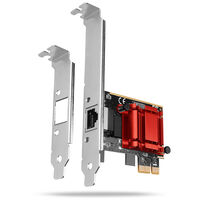


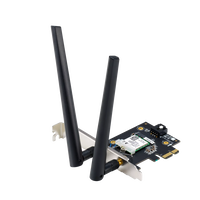
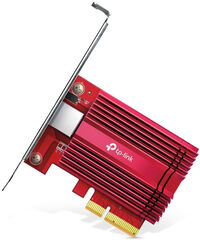
NWWL-153
(0)
- 10 Gbps Networking - Combined with the latest 10GBase-T Technology, TX401 delivers extreme speeds of up to 10 Gbps, which is 10× faster than typical Gigabit adapters, guaranteeing smooth data transmissions for both internet access and local data transmissions
- Versatile Compatibility - With extreme speed and ultra-low latency, 10GBase-T is backwards compatible with Fast Ethernet and Gigabit Ethernet, automatically negotiating between higher and lower speed connections
- CAT6A Ethernet Cable - To maximize TX401's performance, a 1.5 m CAT6A Ethernet Cable is included—rated for up to 10 Gbps while a regular cable is only rated for 1 Gbps
- Low-Profile and Full-Height Brackets - In addition to the standard bracket, a low-profile bracket is provided for mini tower computer cases. Customized options give you the flexibility to find a bracket that perfectly fits your board design
- Comprehensive System Support - Fully compatible with Windows 10/8.1/8/7, Windows Servers 2019/2016/2012 R2, and Linux to meet your diverse operating system needs
Network Cards
Network cards allow you to upgrade your PC – choose between LAN network cards or Wi-Fi network cards that add Wi-Fi and, depending on the model, Bluetooth connectivity to your system.
What Should You Consider When Buying a Network Card?
Before buying a network card, there are several things you should consider:
- Type of network card: If you need an additional LAN port, a LAN network card is the right choice. If your PC does not currently support Wi-Fi, you need a Wi-Fi network card that provides Wi-Fi and, depending on the model, Bluetooth
- Speed: Data transfer speeds vary depending on the model
- PCIe interface: The required PCIe interface varies depending on the model. Check beforehand whether your motherboard provides the required interface
Wi-Fi Network Cards: Wi-Fi 6, Wi-Fi 6E, or Wi-Fi 7?
The Wi-Fi standard determines, among other things, which frequency bands and features your network card can use. Wi-Fi 6 uses established Wi-Fi frequency bands, while Wi-Fi 6E can additionally use the 6 GHz band. Wi-Fi 7 further expands current Wi-Fi technologies and is particularly interesting if your router or access point also supports the standard.
When choosing a model, keep in mind that a newer Wi-Fi card alone is not enough. Your router or access point, operating system, and drivers must also support the desired features.
FAQ – Network Cards
Which Network Card Do I Need?
This depends on how you want to connect your PC to the network. For a wired connection, you need a LAN network card with a suitable transfer speed. If you want to connect your PC via Wi-Fi, a Wi-Fi network card is the right choice. Also check which PCIe interface is used by your motherboard and the network card you want to install.
What Is the Difference Between a LAN and a Wi-Fi Network Card?
A LAN network card connects your PC to a router or switch via a network cable. A Wi-Fi network card establishes the connection wirelessly. LAN is particularly suitable for stable and fast connections, while Wi-Fi offers more flexibility when you do not want to install a network cable.
What LAN Speed Should My Network Card Support?
This depends on your network and intended use. For many home networks, 1 Gbit/s is sufficient. 2.5 Gbit/s is suitable for faster internet connections or higher data rates within the local network. Your router or switch, cabling, and the connected device must also support the respective speed.
Does Bluetooth on a PCIe Wi-Fi Network Card Require an Additional Connection?
Depending on the model, yes. On some PCIe Wi-Fi network cards, Wi-Fi is connected via PCIe, while Bluetooth additionally requires an internal USB connection on the motherboard. Check the connections and manufacturer specifications of the desired network card before buying.
Will a Faster Network Card Make My Internet Faster?
Not automatically. A network card with 2.5 or 10 Gbit/s, for example, enables higher data rates if your router or switch, cabling, and the connected device also support that speed. A faster network card alone does not increase the maximum speed of your internet connection.